
Download Esta+ – Free Statistics Program, Descriptive Analytics, Data Visualization, Regression Analysis
Overview
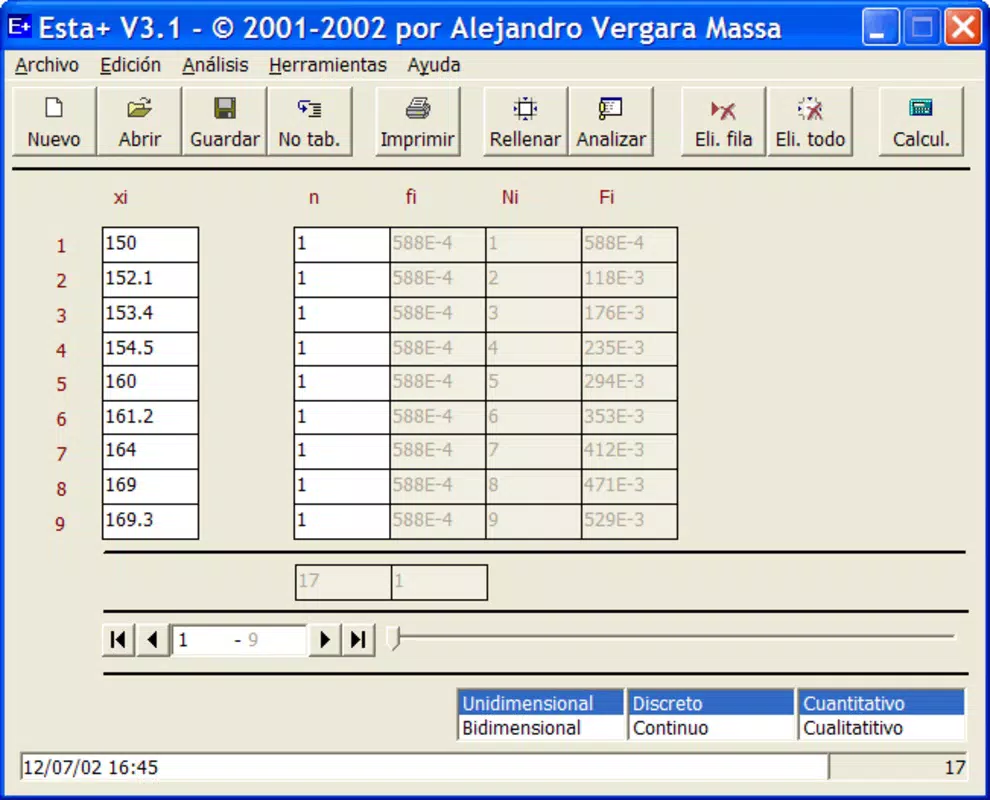
Esta+ is a free statistics program designed for descriptive analytics, offering a robust platform for users who need to perform detailed data analysis and generate visual representations. The application supports both one-dimensional and two-dimensional variables, accommodating discrete and continuous data types, as well as quantitative and qualitative inputs. This flexibility makes it suitable for a wide range of analytical tasks across academic, research, and professional environments. Users can input tabulated or non-tabulated data, enabling seamless integration into existing workflows, especially when transitioning from spreadsheet-based tools.
Designed for both novice and experienced data analysts, Esta+ provides tools to analyze central tendency, dispersion, and functional dependencies through regression analysis. It also includes features for identifying outliers and creating visual outputs such as boxplots and dispersion diagrams. These capabilities enhance data interpretation and support clear communication of findings. The app allows for saving, printing, and editing analysis reports, with automated error checks to improve data integrity and reduce manual verification efforts.
Although the developer did not provide additional technical details, the program has been available since 2003, indicating a long-standing presence in the data analysis ecosystem. Its continued relevance suggests a stable and reliable foundation for statistical processing. For users seeking a lightweight, focused tool for descriptive statistics and visualization, Esta+ fills a niche in the mobile and desktop software landscape, particularly for those who prioritize functionality over modern UI trends.
Key Features & Functionality
- Diverse Data Formats Support: Esta+ handles one-dimensional and two-dimensional variables, including both discrete and continuous data. Users can work with qualitative and quantitative inputs, enabling broad application across different analytical scenarios. Whether entering raw data or importing tabulated tables, the program streamlines the initial data setup process.
- Robust Saving and Export Options: Users can save data tables and analysis reports for future reference or presentation. The ability to print results directly enhances usability in academic and professional settings. Additionally, importing data from spreadsheets improves compatibility with existing workflows, reducing friction when adopting the tool.
- Comprehensive Analysis Tools: The program offers in-depth statistical functions, including measures of central tendency (mean, median, mode), dispersion (variance, standard deviation), and outlier detection. Regression analysis and functional dependency assessment are also supported, allowing users to explore relationships between variables with minimal setup.
- Diagram Creation for Data Visualization: Esta+ enables the creation of visual outputs such as boxplots and dispersion diagrams. These graphical representations help users identify trends, distributions, and anomalies in data, making complex insights more accessible to non-technical audiences.
- User-Friendly Support System: An integrated online help feature provides guidance on statistical formulas and concepts. A probabilities assistant simplifies complex calculations, reducing the learning curve for beginners while still serving advanced users who require precision.
For example, a student analyzing survey results can input responses as qualitative data, compute frequency distributions, and generate a boxplot to visualize response spread. Similarly, a researcher comparing two variables can use regression tools to assess their relationship and export a report for publication.
Interface, UX & Performance
The user interface of Esta+ is designed with functionality over aesthetics, prioritizing accessibility and efficiency for data analysis tasks. Navigation follows a logical flow, allowing users to move between data entry, analysis, and visualization modules with minimal friction. The layout supports clear organization of input fields, result panels, and output options, facilitating a streamlined workflow.
Although the developer did not list formal performance metrics, the application’s long-standing availability suggests a stable runtime environment. It is expected to function reliably across various device categories, including low- to mid-range systems, given its focus on core statistical operations rather than resource-intensive processes. Responsiveness is likely optimized for typical data analysis workloads, with minimal lag during calculations or rendering of diagrams.
Stability is a key consideration, especially when handling large datasets or complex analyses. The inclusion of automated error checks implies that the program actively validates data integrity during input and processing. While no specific compatibility details were provided, the app’s ability to import spreadsheet data indicates a level of robustness in handling external file formats.
Platform Compatibility & Technical Requirements
Esta+ is available for both Windows and Linux operating systems, providing broad accessibility across desktop environments. The developer did not specify minimum OS requirements or exact file size, nor did they list a mobile platform version. As such, it is not confirmed whether Esta+ is available for Android or iOS devices.
Given its release date in 2003, the application was originally designed for desktop computing. The absence of mobile-specific information suggests that the current version may not be optimized for smartphones or tablets. Users seeking a mobile experience should verify official channels before attempting to install the software on a handheld device.
The software version and file size were not disclosed. Compatibility with modern operating systems may depend on legacy support or compatibility layers, particularly on newer Windows or Linux distributions.
Pros and Cons
Pros
- Free to use with no licensing fees
- Supports both one-dimensional and two-dimensional data analysis
- Offers comprehensive statistical functions including regression and outlier detection
- Enables creation of visual outputs like boxplots and dispersion diagrams
- Includes online help and a probabilities assistant for user guidance
- Allows import and export of spreadsheet data for workflow integration
Cons
- Developer did not provide mobile platform availability or version details
- No information on file size, minimum OS, or device compatibility
- Interface may appear outdated compared to modern applications
- Not available for Android or iOS platforms based on current data
- Limited public performance or stability metrics
FAQ
Is Esta+ available for Android or iOS?
The developer did not list mobile platform availability. Based on current information, Esta+ is confirmed for Windows and Linux desktop systems.
Can I import data from Excel or Google Sheets?
Yes, Esta+ supports the importation of tables from spreadsheets, enhancing compatibility with existing data workflows. Specific file format support was not detailed.
Is Esta+ safe to download and install?
While the app has been available since 2003, users should only download from official or trusted sources to ensure security and avoid tampered versions.
Does Esta+ require an internet connection?
Basic functionality does not require an internet connection. However, the online help feature may need connectivity for access to documentation.
How often is Esta+ updated?
The developer did not provide update frequency details. The last known release was in 2003, but ongoing maintenance cannot be confirmed.
Final Thoughts
Esta+ stands out as a dedicated tool for descriptive statistics and data visualization, offering a powerful set of analytical functions within a lightweight framework. Its ability to handle diverse data types, perform regression analysis, and generate visual outputs makes it a valuable asset for students, researchers, and professionals working with quantitative data. The inclusion of automated error checks and user support features enhances its usability across skill levels.
While the absence of mobile availability and limited technical details may restrict its reach, the app remains a reliable option for desktop-based statistical analysis. For users seeking a free, focused tool that prioritizes functionality over flashy design, Esta+ delivers consistent value. Its long-standing presence in the software ecosystem speaks to its reliability and enduring relevance.
Download Esta+ now


